Add a light without the guesswork
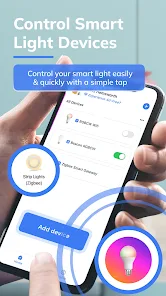
Follow a focused setup flow for compatible Wi-Fi and Bluetooth bulbs, then keep the device ready for the next adjustment.
One app for everyday light control
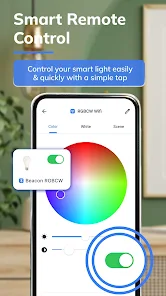
Control compatible Wi-Fi and Bluetooth bulbs, fine-tune colour and brightness, and keep your favourite scenes close at hand.
 Smart LightSmart Home Control
Everything in reach
From the first connection to everyday adjustments, each part of Smart Light is designed around a clear, familiar task.
Follow a focused setup flow for compatible Wi-Fi and Bluetooth bulbs, then keep the device ready for the next adjustment.
Switch lights on or off and tune brightness from one clear control surface instead of reaching for another remote.
Move from warm and comfortable to colourful and expressive with direct colour and tone controls.
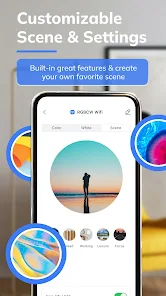
Create reusable scenes for the combinations you return to, so the room is ready with fewer repeated changes.
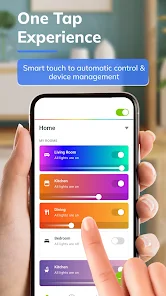
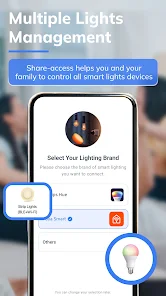
See compatible devices in one place and move between them without losing track of which light you are changing.
A focused interface keeps common controls close, whether you are settling in, working late or winding down.
A closer look
Five focused screens take you from device selection to everyday control, colour and scenes.
From install to ambience
No dense setup manual on this page—just the path from downloading the app to adjusting a compatible light.
Open the Google Play listing and install the Android app from Metaverse Labs.
Choose the device type and follow the in-app guidance for a supported Wi-Fi or Bluetooth light.
Adjust power, brightness, colour or scenes, then return whenever the space needs a change.
One light, many moments
Smart Light keeps the mechanics out of the way so you can focus on the room: brighter when you need clarity, softer when the day is done.
Get Smart LightBring the room up gently with the brightness that works for you.
Choose a clear, comfortable tone for work, reading or study.
Move toward warmer, lower light when it is time to slow the pace.
Good to know
Compatibility can vary by bulb and brand. These answers cover what the current Google Play listing confirms.
Yes. The Google Play listing marks the app as free to install, with ads and optional in-app purchases.
Smart Light is presented for compatible Wi-Fi and Bluetooth smart light bulbs. Check compatibility during in-app setup for your specific device.
That depends on the bulb or brand you use. Follow the requirements shown for your device during setup.
The app includes a multi-light management experience for compatible devices, shown in its official screenshots.
Smart Light · Android
Download Smart Light from Google Play and start with a compatible Wi-Fi or Bluetooth bulb.
Get Smart Light on Google Play